Mobile apps
iOS and Android. Short moments between other things, a thumb instead of a mouse, and notifications that help instead of annoying.
Case study:WellysaI design mobile apps, web apps and dashboards that people use without a manual. I take a product from the first conversation about the idea, through research and a prototype, to screens ready to build.
Good morning, Ola
You have one recommendation this month
Check-up visit
Your last one was 11 months ago
Upcoming
Pick a time
More times
We’ll remind you the day before
Done, see you then!
Tuesday, 6 October, 10:00
A digital product is an app, a dashboard or an online service your customers use every day. Every screen either brings them closer to their goal or makes them guess. My job is to remove the guessing.
iOS and Android. Short moments between other things, a thumb instead of a mouse, and notifications that help instead of annoying.
Case study:WellysaTools people work in, right in the browser: accounts, permissions, settings and dozens of screens that have to work as one.
A lot of data in a small space. Hierarchy, filters and tables where what needs attention is visible at a glance.
Chats, assistants and knowledge search. I design for trust: where an answer comes from, what the AI does not know and how to correct it.
Case study:SesameOne goal: book a visit. First, the path I often find in products before they are designed. Flip the switch and see what is left once every screen has to justify why it exists.
In Wellysa it takes two taps to get from a recommendation to a booked appointment.See how I did it
Seven steps in which a single screen goes from a note taken in our first conversation to a spec for developers. After each one you see the progress and make the calls before anything goes into code.
I start with your business, not with screens. We agree who the product is for, what should change once it ships and how we will know it worked.
Your call: You sign off the goals and scope.
I talk to the people who will use the product and look at how they manage without it today. This is often where it turns out the real problem is somewhere other than we assumed.
Your call: You help me reach your customers.
I lay the product out like a map: which screens there are, how they connect and which way a user gets to their goal. It is the cheapest moment for changes, because we move arrows, not code.
Your call: You approve the paths and the order of work.
I sketch the key screens in greys, with no colour and no photos. We talk about what is on the screen and in what order, not about the shade of a button.
Your call: You choose the direction.
Wireframes get your brand: typography, colour, icons and motion. I design every state of every screen and build them from components your team will use for the next features.
Your call: You approve the look.
I link the screens into a clickable prototype that behaves like the app. I hand it to a few people from your audience and watch where they get stuck. Fixes cost hours here, not weeks of development.
Your call: You decide which fixes go in.
Developers get a design with sizes, states and rules of behaviour. I stay on the project: I answer questions and review the built screens before they reach users.
Your call: You ship the product.
Nobody praises an app for a good error message, but everyone remembers the one that lost what they had typed. A product holds hundreds of these decisions. Flip the switch to see six of them.
It says what went wrong and how to fix it, right next to the field it is about.
Are you sure?
This action cannot be undone.
NoYesThe action happens straight away and can be undone for a few seconds. No “Are you sure?” pop-ups.
A button is at least 44 points, even when its icon is smaller. A thumb is not a cursor.
Check-up visit
Tuesday, 10:00
Text contrast that meets WCAG. The app can be read in sunlight and without glasses.
A tap shows straight away that something is happening, and a moment later that it worked.
An error occurred
The operation failed (code 0x80070005).
OKButtons say what they will do, and messages sound like a person, not like a server.
A mock-up usually shows a screen on its best day: the data is there, the internet works, the user knows what they are looking for. I design the other versions too, because they are where people most often give up.
An empty list is an invitation to take the first step, not a dead end.
A mobile health app and an AI tool for companies. Different industries, the same process.
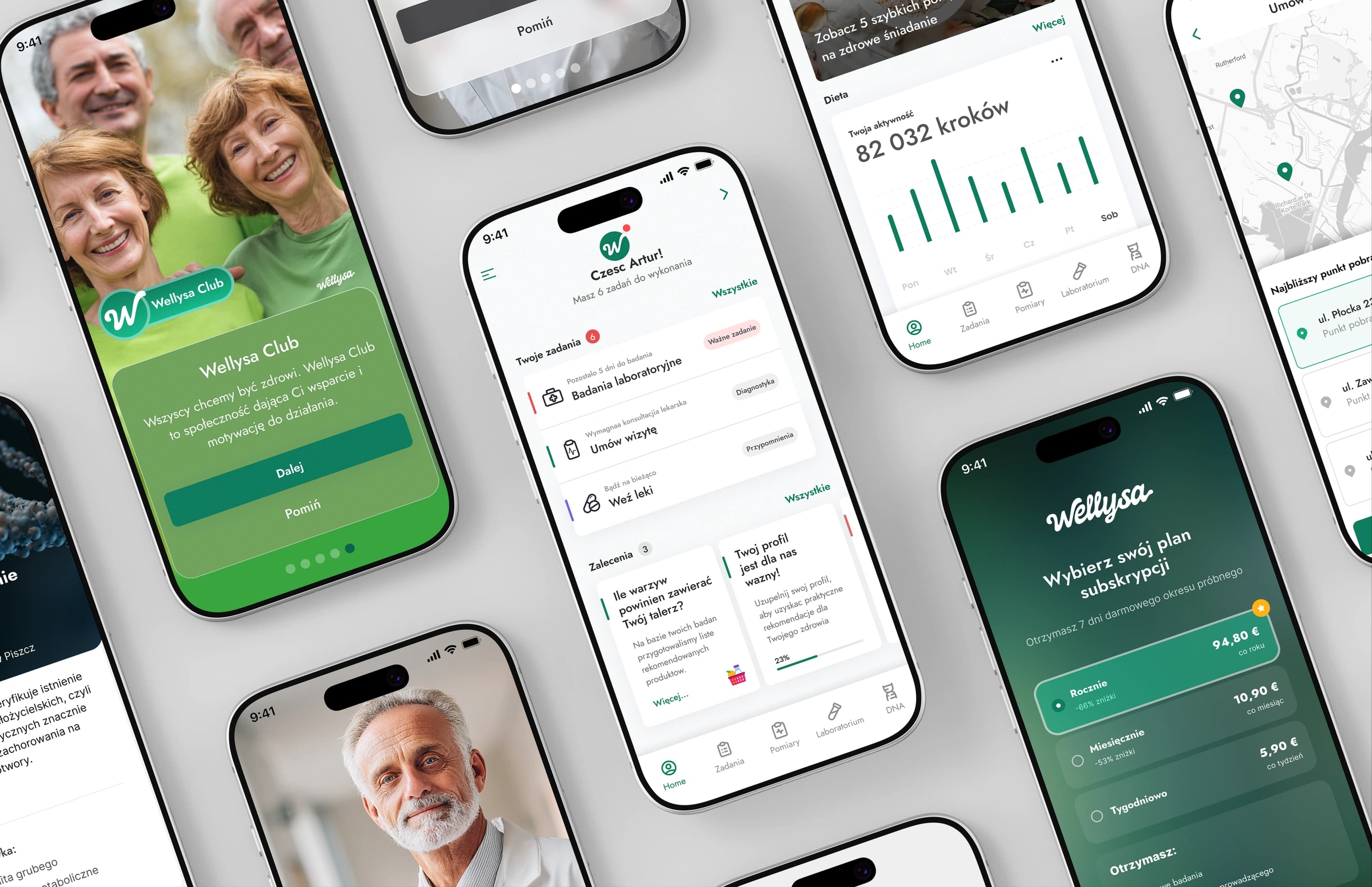
A personal health assistant that turns test results into one concrete next step and guides people from a questionnaire to a booked appointment.
What I designedA secure workspace with an AI chat that gives a company access to all of its internal knowledge without losing control over its data.
What I designedI have an idea for an app
From a workshop and research to a tested prototype and screens ready to build. I help you decide what has to be in the first version and what can wait.
First stepA workshop on goals and scope
We have a product, but people get lost in it
I look at the product through your users’ eyes, talk to your customers and dig into the data. You get a list of problems ranked by business impact and a design for the fixes.
First stepA review of the product and data
We have a team, but no designer
I join your product team: I work in your sprints, with your product manager and developers, and I own the user experience.
First stepA conversation about your roadmap
You work with me directly
From the first conversation to reviewing the build. No middlemen, and no handing the project on to other people.
With a conversation. A few sentences about who the product is for and what it should change are enough. We put together the brief, the scope of the first version and the plan of work in the first stage.
It depends on the scope. A single flow in an app usually takes two to four weeks, while a product built from scratch is measured in months. After our first conversation I give you a specific date and stick to it.
I price every project individually, based on its scope and complexity. After a short conversation I will prepare an offer tailored to your needs.
For digital products I focus on UX/UI and hand the build over to a development team: I work closely with them and can recommend people I trust. After handoff I stay available and review the built screens.
Not always. For a new product, or when the risk of getting it wrong is high, a few interviews and a prototype test pay for themselves quickly. For smaller changes an expert review and the data you already have are enough.
The design of every screen and its states in Figma, a component library, a clickable prototype and a spec for developers. We agree the scope at the start, so you know what you will get before we begin.
Every stage ends with a meeting where I show the progress and collect your comments. We only move on once you approve the direction, so nothing surprises you at the end.